
I listen to Quran recitation while I work, and for years that meant a static album cover on a second screen. I wanted something calmer and more alive: one still, brand-consistent frame per Surah, with a slow, glowing waveform that actually follows the recitation. Nothing that competes with the audio. No commentary, no interruptions, no clip-art.
This post is the whole pipeline, end to end, from a folder of MP3s to a YouTube-ready playlist of all 114 Surahs. It is mostly Pillow, ffmpeg and bash. The finished playlist is here:

The shape of the pipeline
Every stage is a plain file on disk, so I could stop anywhere, look at the output, and re-run only the stage that was wrong. That sounds obvious. It saved me from re-rendering twenty-two gigabytes more than once.
Step 0 — start with clean, boring inputs
The source is a complete recitation by Sheikh Sa'ad Al-Ghamdi: 114 MP3s, stereo, 44.1 kHz, 128 kbps, with proper ID3 tags. Before touching video I renamed everything into one predictable pattern, 001-al-fatihah.mp3 through 114-an-nas.mp3. Zero-padded number, then a lowercase ASCII slug.
That naming convention is the entire "database" for the project. Every later stage derives its inputs and outputs from it: the background is bg-001-al-fatihah.png, the video is 001-al-fatihah.mp4, the upload notes are 001-al-fatihah.md. When something failed at 2 a.m. I always knew exactly which file to look at.
Total audio: a little under 25 hours. The longest Surah, Al-Baqarah, is nearly two hours on its own; the shortest is sixteen seconds. Keep that range in mind, because it is what eventually broke the render.
Step 1 — a manifest, not a loop over the filesystem
The first script I wrote was not a renderer. It was a one-line-per-Surah manifest, generated once with ffprobe:
for f in [0-9][0-9][0-9]-*.mp3; do
  num="${f:0:3}"; slug="${f:4:${#f}-8}"
  dur=$(ffprobe -v error -show_entries format=duration \
        -of default=nw=1:nk=1 "$f")
  printf '%s|%s|%s|%s|%.2f\n' "$num" "$slug" "$name" "$f" "$dur"
done > _pipeline/surahs.txt
Each line is num|slug|display name|mp3|duration. The display name is the one place a human touched the data, because "Ali 'Imran" and "An-Nisa'" are not things you want a slug-to-title function guessing at.
Why a manifest instead of globbing in every script? Three reasons that only became clear later:
- Ordering is a sort, not a rewrite. Rendering shortest-first gave me fast visual feedback; rendering longest-first overnight used the machine best. Both are a
sorton the manifest. - Duration is known before ffmpeg starts. The background needs it for the footer text, the renderer needs it to loop the still image for exactly the right time, and the resume check needs it to decide whether an existing video is complete.
- The manifest is a checklist. 114 lines in, 114 videos out. Anything else is a bug.
Step 2 — one background per Surah, generated, not designed
I wanted the videos to look like they belonged to the same series as this site, so the template is the site's palette: a near-black indigo base, a single lavender accent, near-white type. The background itself is a real photograph of an open Quran, but pushed very far back so it reads as texture rather than as a picture.
The whole thing is about a hundred lines of Pillow. The recipe for the photo layer:
def photo_background(photo_path):
    src = Image.open(photo_path).convert("RGB")
    crop = cover_crop(src, W, H).filter(ImageFilter.GaussianBlur(radius=10))
    crop = ImageEnhance.Contrast(crop).enhance(1.05)
    # duotone: grayscale, then recolour black -> deep indigo, white -> lavender
    gray = ImageOps.autocontrast(ImageOps.grayscale(crop), cutoff=1)
    base = ImageOps.colorize(gray, black=BG_BOTTOM, white=LIGHT_LAVENDER, mid=ACCENT)
    base = add_soft_glow(base)          # radial lavender glow behind the title
    base = add_vignette(base)           # darken the corners
    # finally a 90% brand-colour wash so the photo becomes texture
    return Image.alpha_composite(base.convert("RGBA"),
                                 vgrad_rgba(W, H, BG_TOP, BG_BOTTOM, int(255 * 0.90)))
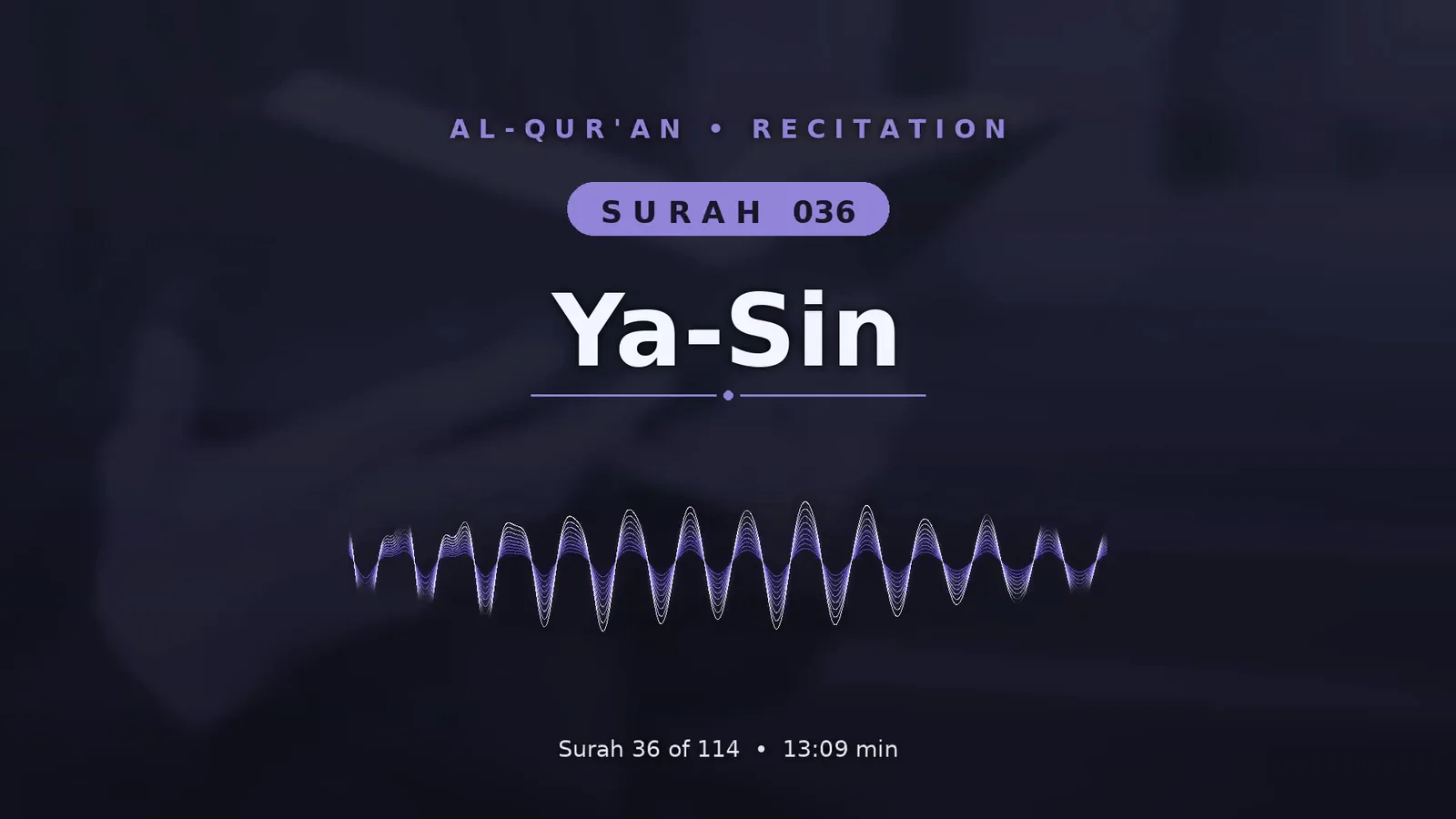
On top of that go five typographic elements, all centred: a spaced-out kicker ("AL-QUR'AN • RECITATION"), a pill badge with the Surah number, the Surah name at 132 px, a thin divider with a dot, and a footer reading "Surah 36 of 114 • 13:09 min". Text gets a blurred black drop shadow underneath so it stays legible no matter what the photo is doing behind it.
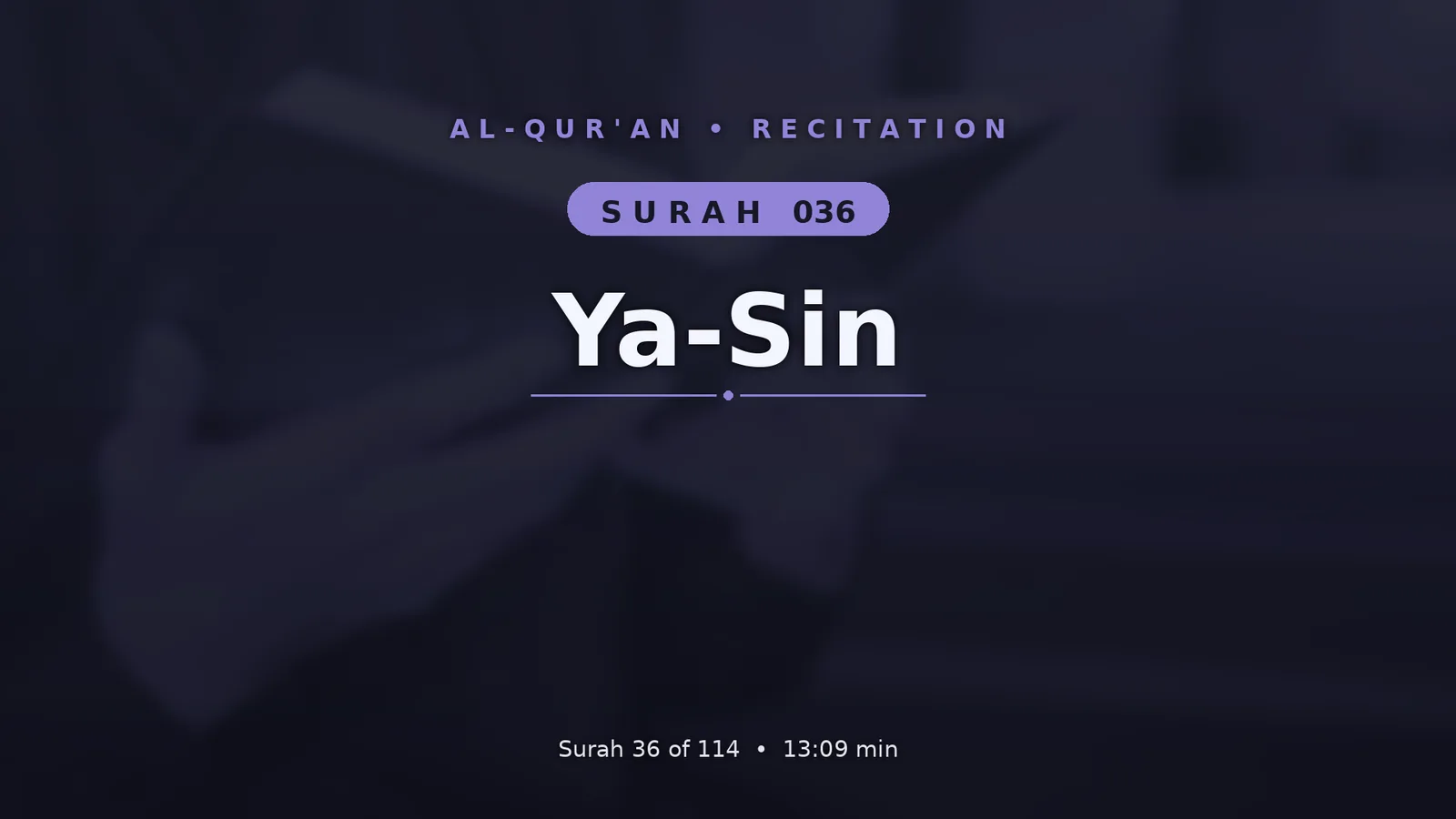
Generating all 114 takes a few seconds. That speed is the point: I iterated on the template maybe forty times, and every iteration regenerated every background, so I never had to wonder whether Surah 73 was still on the old design.
Step 3 — the waveform, and making it calm
This is the part I spent the most time on, and the part that makes the videos worth watching rather than just listening to.
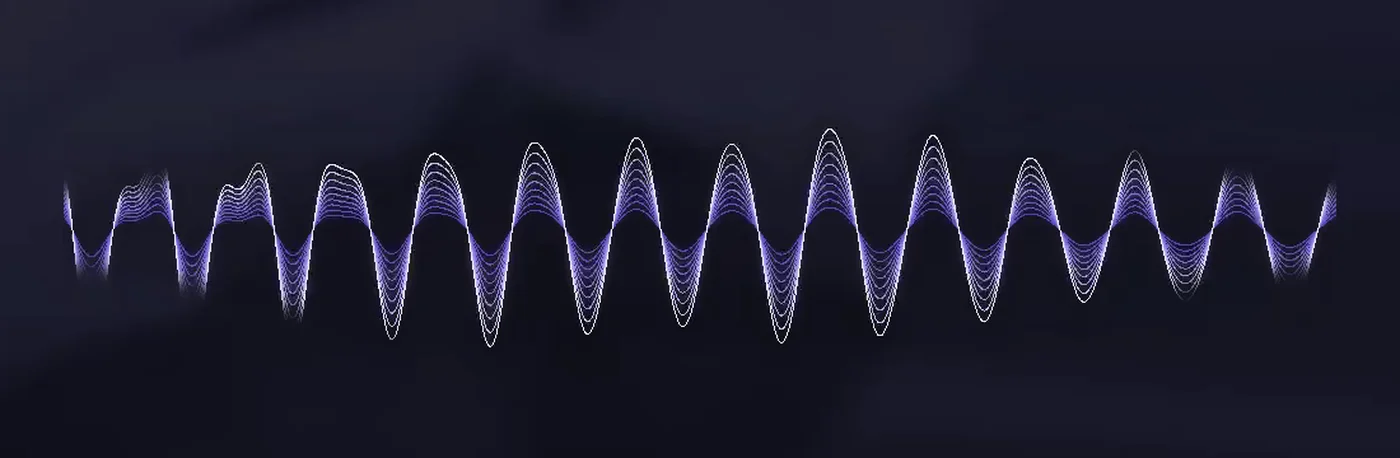
ffmpeg's showwaves filter will draw a waveform for you in one line. The default result is a jittery white oscilloscope. It is technically a waveform and it is exactly the wrong feeling for recitation. Three changes fixed it.
Filter the audio the visualiser sees, not the audio the listener hears. The recitation goes to the output untouched. A second copy of the same track is folded to mono, low-passed twice at 400 Hz, and level-normalised before it reaches showwaves. The low-pass strips the sibilants and breath noise that make a waveform look nervous, leaving the slow swell of the voice. The normalisation keeps the wave the same visual size whether the reciter is whispering or projecting.
Draw it nine times. Instead of one line, the filtered audio is split into nine copies at decreasing volume, each drawn in a slightly darker shade of lavender, and stacked. The loudest strand is almost white and sits on the outside; the quietest is deep violet and sits near the centre line. Together they read as a single ribbon with depth.
Mask the ends and add a glow. A lens-shaped grayscale mask multiplies the waveform's alpha so it fades to nothing at both edges instead of stopping dead. Then the whole ribbon is blurred twice — once wide, once tight — with boosted alpha, and layered under the sharp version. That is the glow.
The filter graph is long, so here is the readable version of it, one stage per block:
# 1. the visualiser's private copy of the audio: mono, slow, level
[1:a] aformat=channel_layouts=mono,
      lowpass=f=400, lowpass=f=400,
      dynaudnorm=f=200:g=21:p=0.9,
      asplit=9 [s0]...[s8];

# 2. nine strands, each quieter and darker than the last
[s0] volume=1.00, showwaves=s=1000x300:mode=p2p:colors=0xF2EEFF:draw=full,
     format=rgba, colorkey=0x000000:0.25:0.1 [l0];
[s1] volume=0.88, showwaves=...:colors=0xC9C0FF..., colorkey=... [l1];
...
[s8] volume=0.22, showwaves=...:colors=0x5747B8..., colorkey=... [l8];

# 3. stack quiet-to-loud so the bright strand ends up on top
[l8][l7] overlay [st7]; [st7][l6] overlay [st6]; ... [st1][l0] overlay [st0];

# 4. multiply alpha by the lens mask so the ends feather out
[st0] split [w1][w2];
[w1] alphaextract [a1];
[2:v] format=gray [mask];
[a1][mask] blend=all_mode=multiply [a2];
[w2][a2] alphamerge, split=3 [wm1][wm2][wm3];

# 5. glow: wide blur + tight blur, alpha doubled, under the sharp ribbon
[wm1] gblur=sigma=28, colorchannelmixer=aa=2 [glowA];
[wm2] gblur=sigma=8,  colorchannelmixer=aa=2 [glowB];
[0:v][glowA] overlay=(W-w)/2:590 [v0];
[v0][glowB]  overlay=(W-w)/2:590 [v1];
[v1][wm3]    overlay=(W-w)/2:590 [v]
colorkey on pure black is the trick that lets a showwaves output, which is drawn on an opaque black canvas, become a transparent layer. Everything else is compositing.
Step 4 — rendering 114 videos without babysitting them
The first full render script was one ffmpeg command per Surah: still image looped for the duration, the audio, the filter graph, encode. It worked beautifully on the short Surahs and then failed on Al-Baqarah with a muxing error, exit code 28, about half an hour in.
The cause is a mismatch in speed. Decoding the audio is nearly free, while the nine-strand filter graph is slow. When the two streams share one output, ffmpeg's muxing queue fills up with audio packets waiting for video frames that have not been drawn yet. On a two-hour input, the queue eventually overflows.
The fix was to stop asking ffmpeg to do two things at once. Every Surah now renders in two passes:
# pass 1: video only, no audio stream to race against
ffmpeg -nostdin -y -loglevel error \
  -loop 1 -t "$dur" -i "$bg" -i "$mp3" -loop 1 -t "$dur" -i wave-mask.png \
  -filter_complex "$FILTER" -map "[v]" -an \
  -c:v libx264 -preset veryfast -crf 20 -pix_fmt yuv420p -r 25 "$tmpv"

# pass 2: copy the finished video, add the original audio, done in seconds
ffmpeg -nostdin -y -loglevel error -i "$tmpv" -i "$mp3" \
  -map 0:v -map 1:a -c:v copy -c:a aac -b:a 160k -shortest \
  -movflags +faststart "$out.part.mp4" && mv -f "$out.part.mp4" "$out"
Two other habits made the overnight runs painless:
- Write to a
.part.mp4and rename on success. A killed render never leaves a file that looks finished. - Make the script resumable. Before starting a Surah, probe any existing output; if its duration is within 1.5 s of the manifest's, skip it. I could stop the machine, come back the next evening, run the same command, and it picked up where it left off.
The last piece was parallelism, which in bash is just job control:
while IFS= read -r line; do
  while [ "$(jobs -rp | wc -l)" -ge "$JOBS" ]; do sleep 2; done
  bash _pipeline/render_one.sh "$line" &
done < /tmp/_surah_order.txt
wait
Four Surahs at a time on software x264 was the sweet spot on my Mac; the script also has a switch for the hardware h264_videotoolbox encoder when I wanted speed over file size. The final set is 114 MP4s, 1080p at 25 fps, roughly 2 Mbps video and 160 kbps AAC, twenty-two gigabytes in total.
Step 5 — metadata is content too
A video with a bare filename for a title is not YouTube-ready, and writing 114 titles by hand is exactly the kind of task that gets done badly by the sixtieth one. So the manifest grew one more output: a Markdown note per Surah with everything the upload form needs, generated from the same data.
Each note has a title that follows a fixed formula and stays under YouTube's 100-character limit — English name, translated meaning, reciter, Arabic name, and position in the Quran — plus a short description with the chapter number, verse count, place of revelation, duration and reciter, and a link back to the playlist. The tags carry every common Latin spelling of the reciter's name, because that is how people actually search. And a short upload checklist at the bottom of each note: playlist, category, language, visibility.
Generating these was maybe twenty minutes of work. It is the difference between a folder of files and a publishable series.
Step 6 — publish as one playlist, not 114 videos
All 114 went to the Seerah Stories channel and into a single playlist, in Quran order, with every description linking back to that playlist. The reasoning is simple: nobody discovers Surah 87 on its own, but someone who finds Al-Fatihah and likes the format will let the playlist run.
What I'd tell myself at the start
- Filter the visualiser's audio separately. This one decision is most of the difference between "screensaver" and "calm."
- Never render audio and a heavy video filter in the same ffmpeg pass on long inputs. Two passes, always.
- Put every intermediate on disk with a predictable name. Backgrounds, silent renders, metadata. It made iteration cheap and failures legible.
- Make it resumable before making it parallel. Parallel-and-fragile is worse than serial-and-resumable.
- Generate the boring parts. Titles, descriptions and tags are data, and the manifest already had it.
If you want to see the result rather than read about it, the playlist is below. It is meant to be left running.