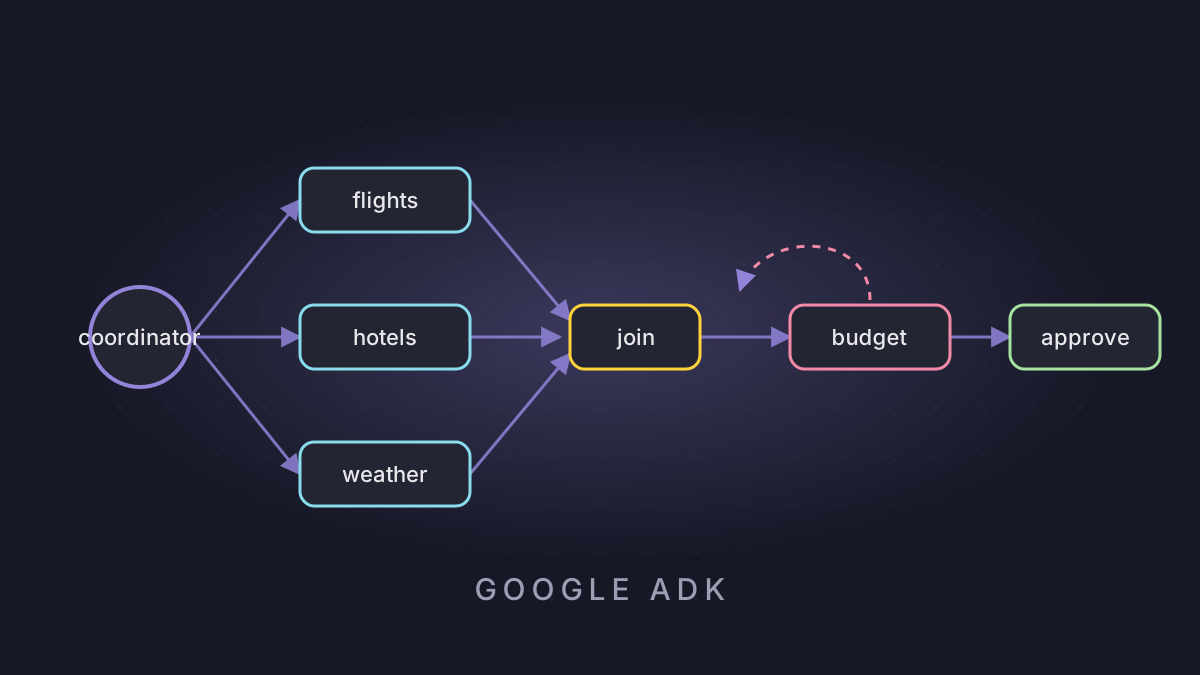
Give an AI agent one real job: plan a team offsite in Lisbon, six people, under $5,000.
Watch what happens inside. One agent becomes a team. Three scouts search flights, hotels and weather at the same time. A critic checks the numbers and throws the first plan out, because it's $600 over budget; plan two fits. Then, before a single dollar moves, the whole system stops and waits for a human to approve.
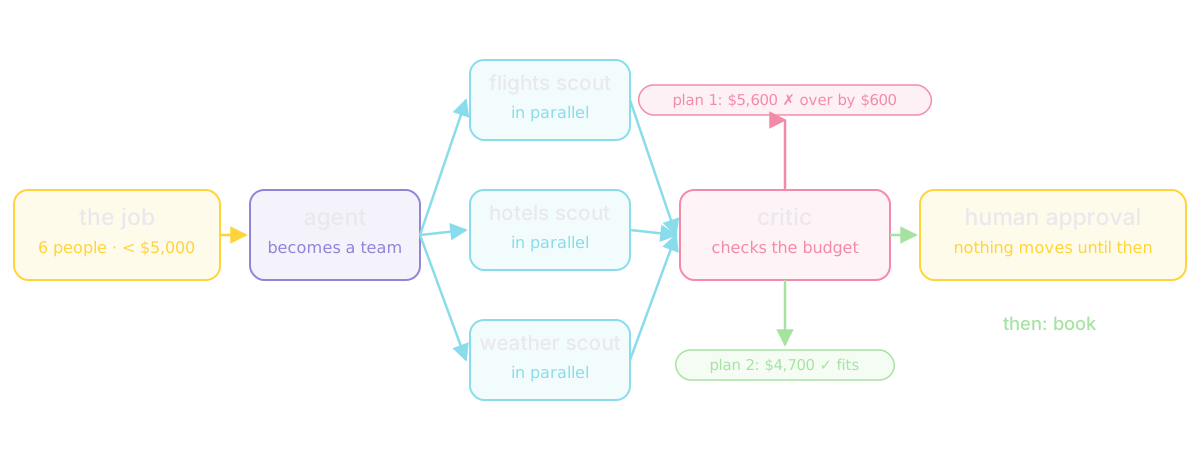
That isn't a chatbot. It's an agent system, and Google's Agent Development Kit (ADK) is a kit for building systems like it. This post walks through ADK from the first agent to a deployed graph: what each piece is, where the data lives, and how it moves. Along the way, Priya, who is organizing that offsite, and her teammate Kenji make the examples concrete.
Google ADK Explained: Agents, State, Workflows and Guardrails (ADK 2)
How the code was run. Every output below is from a real run of google-adk 2.11.0 on Python 3.12. The only stand-in is the model: a small scripted class (a real ADK BaseLlm subclass) replays fixed answers in place of Gemini, so every run is repeatable and free. The runner, the events, the state, the tools and the workflow engine are all real ADK.
What ADK is
ADK is Google's open-source framework for building agents and teams of agents. It's Apache 2.0 and free. Google announced it at Cloud Next in April 2025 as the framework behind agents in its own products. Today the Python package is at 2.11 (October 2026). TypeScript and Go are also on version 2, and Java and Kotlin are on version 1.
It's built for Gemini but not locked to it. Claude, open models and hundreds of others plug in through a model class or the LiteLLM connector. It runs anywhere Python runs.
The shape: five layers
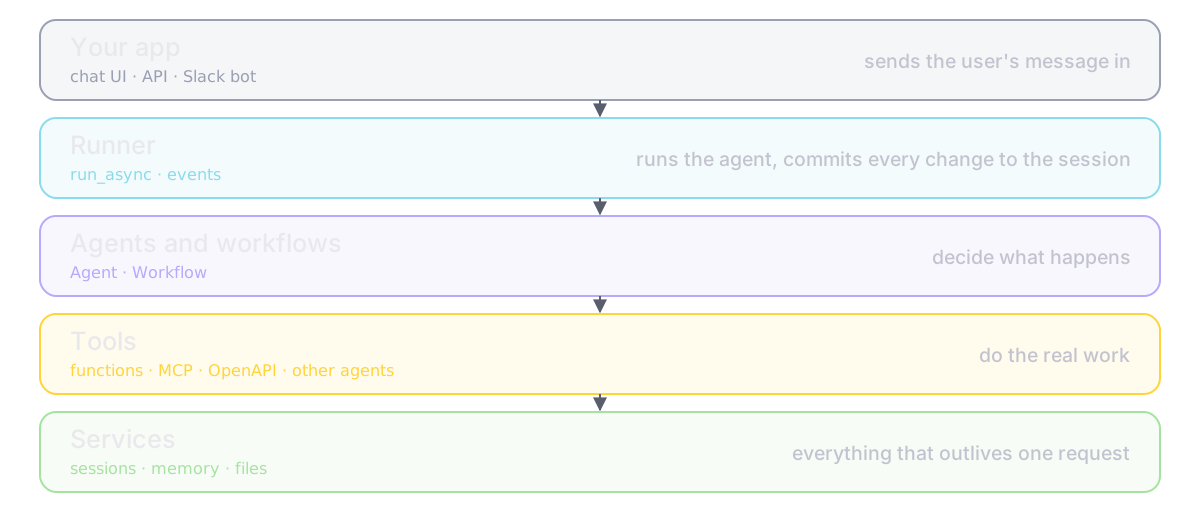
Before any code, picture five layers:
- Your app (a chat UI, an API, a Slack bot) sends the user's message in.
- The Runner runs the agent and commits every change to the session as an event.
- Agents and workflows decide what happens.
- Tools do the real work: your functions, other agents, outside services.
- Services (sessions, memory, files) hold everything that has to outlive one request.
Keep that picture in mind; every section below is one of those layers.
The agent
An agent is a small object. For a first agent, five fields matter:
trip_desk = Agent(
    name="trip_desk",
    model=model(...),        # Gemini in production
    description="Plans team trips.",
    instruction="You help plan team trips. "
                "Use tools for facts; never guess the weather.",
    tools=[get_weather],
)
The name lets other agents find it. The instruction is its job. The description is what other agents read when they decide who should handle a request, so write it like a job title. There's no hidden prompt chain: the instruction and the tools go to the model on every turn.
Tools: your docstring is a prompt
A tool is a Python function. ADK reads it and builds the description the model sees:
def get_weather(city: str) -> dict:
    """Returns today's forecast for a city.

    Args:
        city: The city name, for example "Lisbon".
    """
    return {"city": city, "forecast": "sunny", "high_c": 24}
schema the model sees: {'name': 'get_weather', 'parameters_json_schema': {'properties': {'city': {'title': 'City', 'type': 'string'}}, 'required': ['city'], ...}}
description: Returns today's forecast for a city.The function name becomes the tool name, the type hint becomes the parameter type, and the docstring becomes the description. A vague docstring means a model that guesses when to call it.
The model never runs anything itself. Asked about the weather, it returns a request to call get_weather, ADK runs your function, and the model writes the reply. One question left four events in the session:
trip_desk    call get_weather(city='Lisbon')
trip_desk    result get_weather -> {'city': 'Lisbon', 'forecast': 'sunny', 'high_c': 24}
trip_desk    text 'Lisbon looks great: sunny, 24°C. Pack light.'
events stored in the session: 4 | authors: ['user', 'trip_desk', 'trip_desk', 'trip_desk']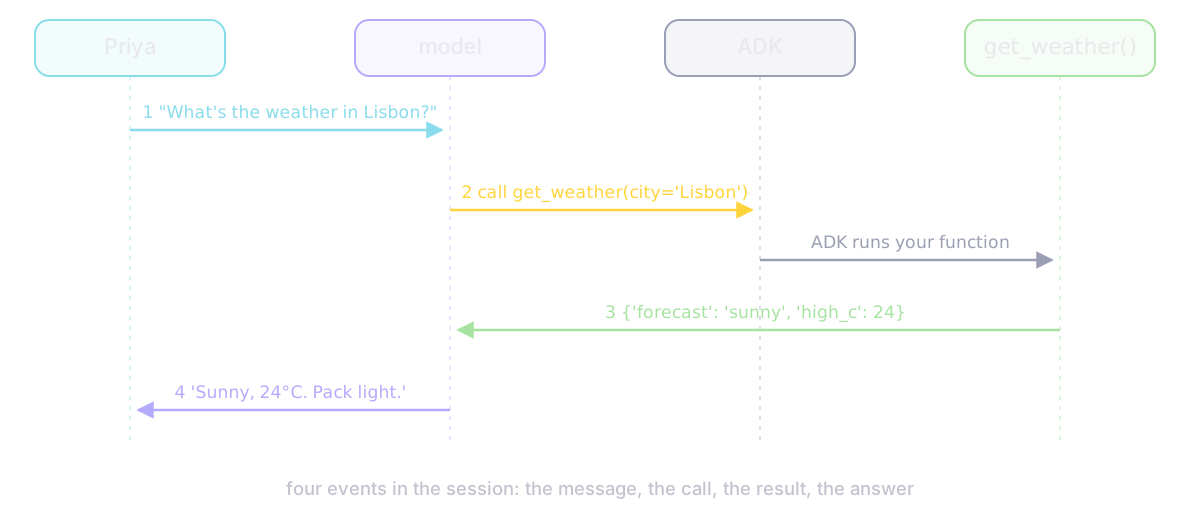
Tools don't have to be your own functions. There are built-ins (Google Search, code execution), whole MCP servers, any REST API from its OpenAPI spec, long-running tools that report back later, and other agents wrapped as tools. A tool that asks for a tool_context gets a window into the session: it can read and write state, save files and search memory.
Events: the part that makes everything else make sense
This is the one to learn first. The Runner starts the agent. The agent works until it has something to report (a tool call, a result, a reply), yields it as an event, and pauses. The Runner commits the event: any state change on it is written to the session right then, and the event goes up to your app. Then the agent resumes, now seeing the committed state.
Yield, commit, resume. That's the whole engine.
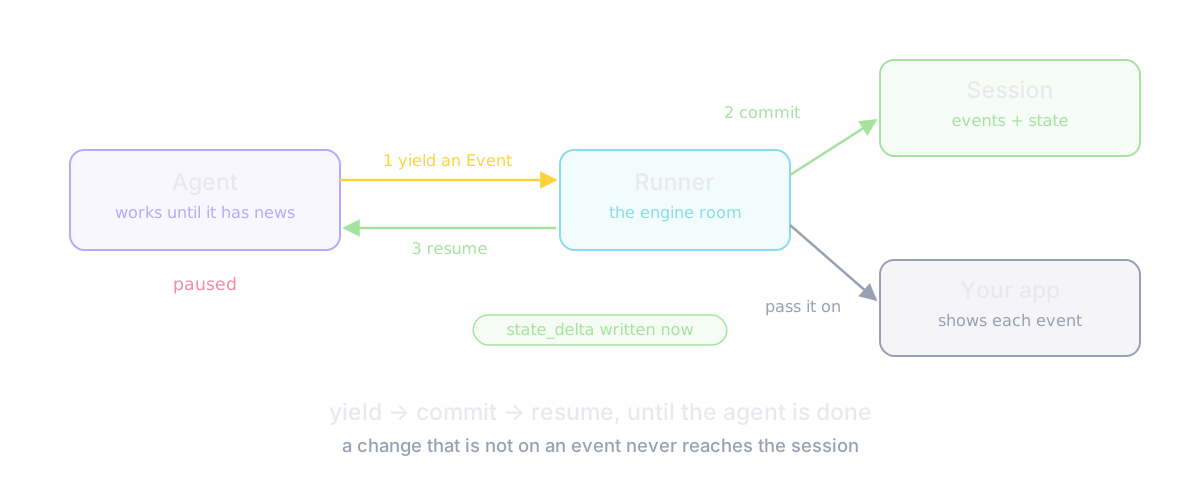
An event carries its author, its content, and its actions: state_delta (the state changes it carries), artifact_delta (files saved), transfer_to_agent, and escalate. The rule that follows: every change in ADK travels on an event. If it's not on an event, it didn't happen.
State: the prefix is the lifetime
A session is one conversation: the list of events, plus state, a small dictionary of facts. State has four scopes, and the key's prefix picks one:
| Prefix | Lives for | Stored |
|---|---|---|
| none | this session | yes, if the service persists |
user: | every session this user opens | yes |
app: | every user of the app | yes |
temp: | this one turn | never |
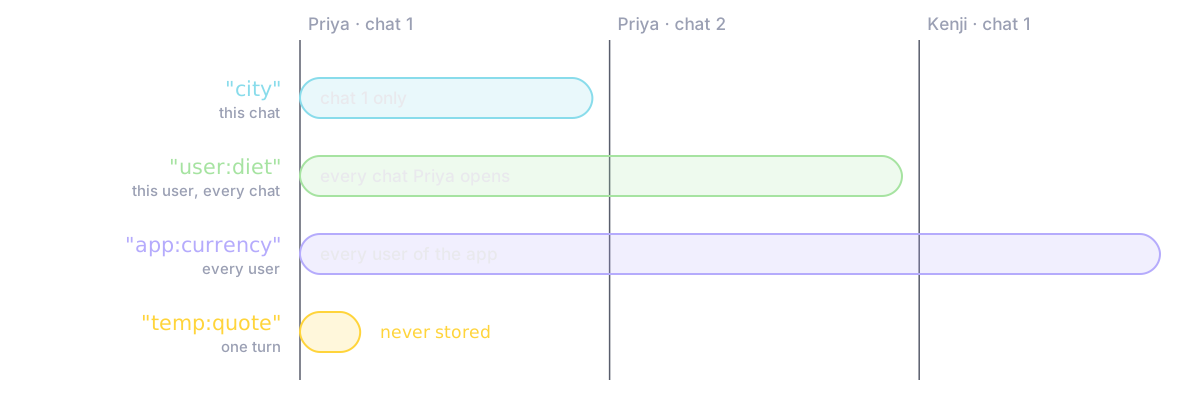
We had one tool write one key of each kind, then opened a new session for Priya and one for Kenji:
state_delta={'city': 'Lisbon', 'user:diet': 'vegetarian', 'app:currency': 'EUR'}
priya, same session : {'city': 'Lisbon', 'app:currency': 'EUR', 'user:diet': 'vegetarian'}
priya, new session  : {'app:currency': 'EUR', 'user:diet': 'vegetarian'}
kenji, new session  : {'app:currency': 'EUR'}
The temp: key never even made it into the state delta. Priya's new chat lost the city but kept her diet. Kenji got only the app key. Same storage, same code: the prefix did all of it.
State is also how agents pass data. output_key="hotel" saves an agent's final answer into state["hotel"], and {hotel} in another agent's instruction is filled in before its model sees it. Here's what the writer's model actually received:
Write day 1 of the itinerary. Hotel: Hotel Alfama, $140/night, 0.4 km from venue. Diet: vegetarian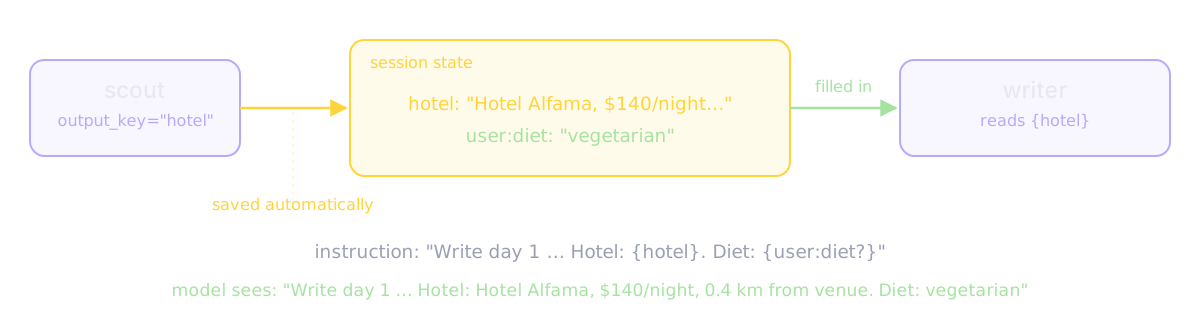
The trap. Fetch a session and set its budget directly on the object, and the write is lost:
1) direct write  -> {'budget_usd': 5000}
   via an event -> {'budget_usd': 4500}
Inside ADK you rarely hit this, because tool_context.state and output_key make the event for you. In your own code, always go through an event.
Memory and files
A session is one conversation. Memory is the searchable archive of past ones. While planning the trip, Priya mentioned once: "We're all vegetarian." When the trip is done, the app adds that whole session to the memory service, and a month later a brand new conversation can search it:
a month later, search 'vegetarian': ["We're all vegetarian.", 'Noted: the whole team eats vegetarian.']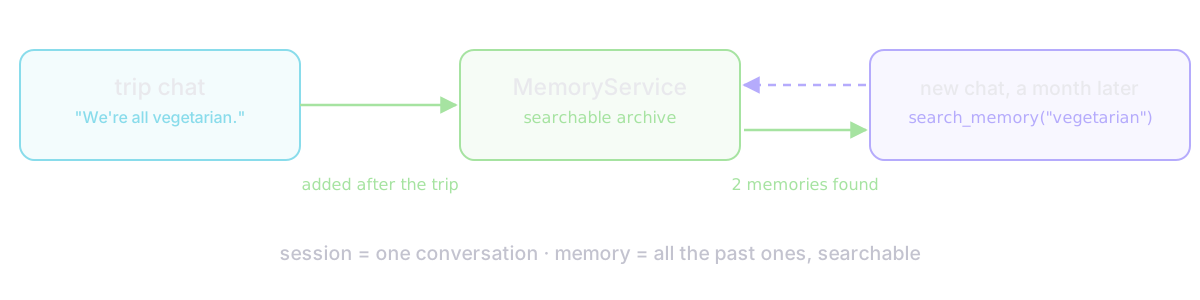
In development that's keyword matching. In production it's Memory Bank on Google's Agent Platform, which extracts facts and searches by meaning.
Artifacts are files, versioned on every save:
versions of itinerary.md: [0, 1]
latest: # Lisbon v2, 3-star hotel
And whether any of it survives a restart depends on the service. We wrote a session in one process and read it from a brand new one:
process 2, in-memory: session not found
process 2, sqlite   : found 1 event(s), state {'hotel': 'Hotel Alfama', 'user:diet': 'vegetarian'}
In-memory is for your laptop. Anything real needs a database or the managed service. (Good news for local work: adk web now saves sessions to .adk/session.db by default.)
Teams: transfer versus AgentTool
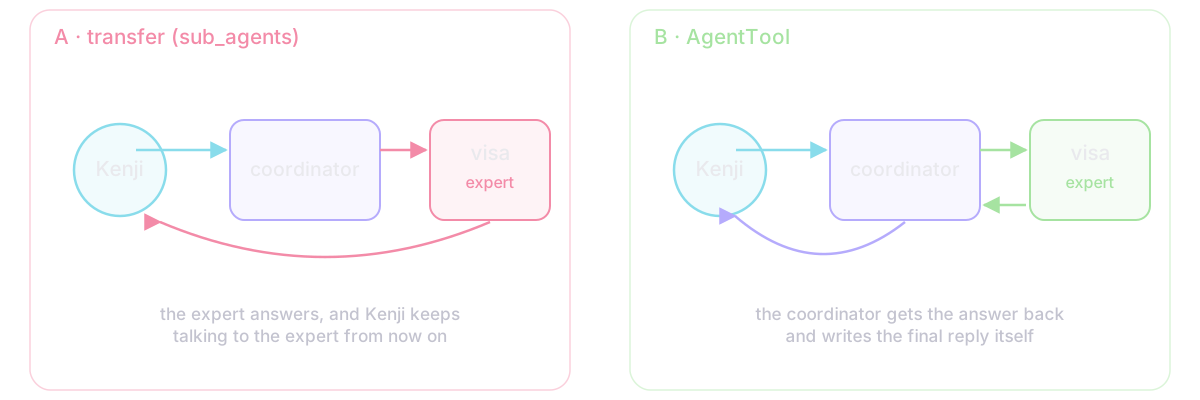
One agent juggling too many tools and jobs starts making mistakes, so you split the work: a coordinator with specialists as sub-agents. The coordinator routes on each specialist's description. Kenji asks whether he needs a visa, and there are two ways to send it to the visa expert:
A) transfer (sub_agents)
  coordinator  call transfer_to_agent(agent_name='visa_expert')
  visa_expert  text 'Kenji needs no visa for 90 days.'
B) AgentTool
  coordinator  call visa_expert(request='Does a Japanese citizen need a visa?')
  coordinator  result visa_expert -> {'result': 'No visa for stays up to 90 days.'}
  coordinator  text 'Good news: Kenji can travel visa-free. Booking continues.'
Transfer is a receptionist putting you through: the specialist takes over the conversation. AgentTool is asking a colleague and answering the customer yourself: control comes back. ADK 2 adds a sub-agent mode: chat keeps talking to the user, task returns on its own when done, single_turn answers once and returns.
Workflows: what ADK 2 changed
ADK 2 has two building blocks: Agent and Workflow. An agent decides its own next step. A workflow follows a graph you draw, where a node is an agent, a tool, or a plain Python function, and each node's output is the next node's input.
Fan-out and join. Three scouts start together and meet at a join, which hands the next node one dict keyed by scout name:
gather = JoinNode(name="gather")
trip = Workflow(name="trip", edges=[
    ("START", flights_scout, gather),
    ("START", hotels_scout, gather),
    ("START", weather_scout, gather),
    (gather, merge),
])
hotels_scout done at 0.2s
weather_scout done at 0.4s
flights_scout done at 0.6s
total wall time: 0.6s (the waits add up to 1.2s) · model calls: 0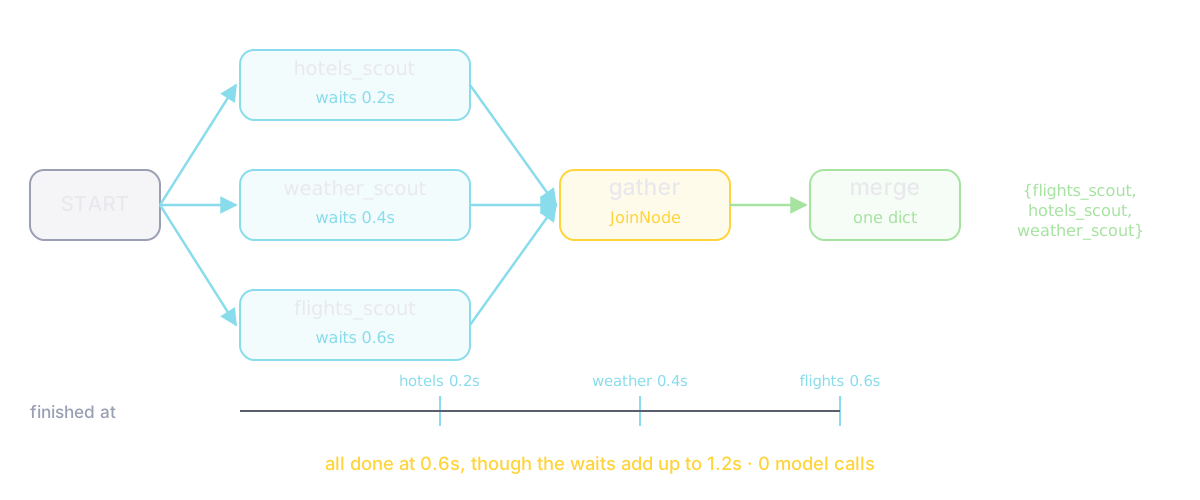
Why a join and not shared state? With ADK 1's ParallelAgent, two scouts writing the same key raced, and the slower one silently won. A join keeps each output under its own name.
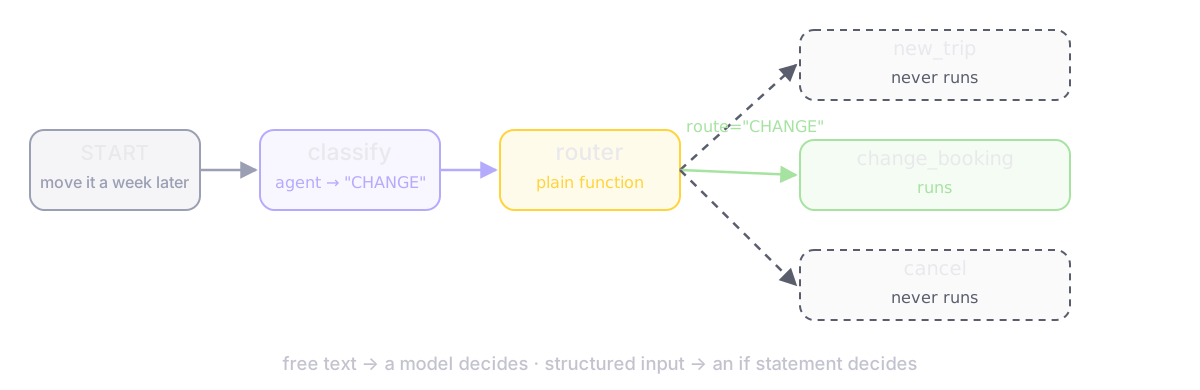
Routing. A function returns Event(route="CHANGE"), and only that branch runs. Use a model when you need to understand free text; when the input is already structured, like a status or an amount, an if is cheaper and never guesses.
Loops are back-edges. The docs warn that a graph cycle isn't bounded automatically, so our budget check also stops after five rounds:
refine@1/writer@1          Draft 1: 4-star hotel, total $5,600
refine@1/budget_check@1    route='REVISE'
refine@1/writer@2          Draft 2: 3-star hotel, total $4,700
refine@1/budget_check@2    route='DONE'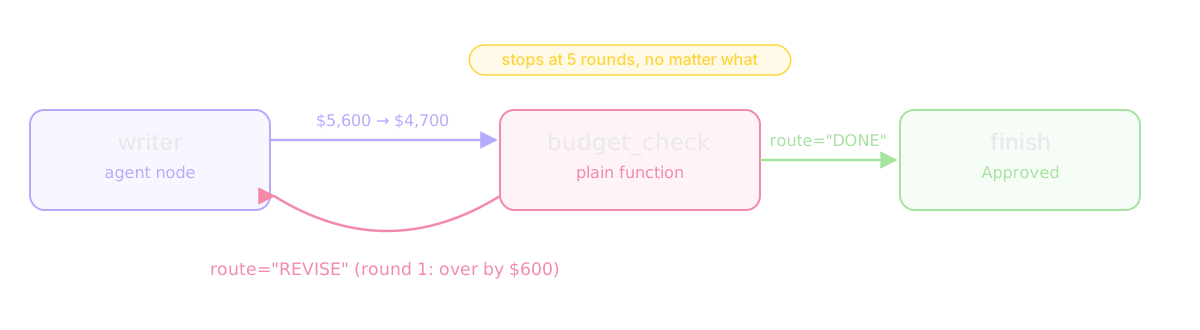
Coming from ADK 1? SequentialAgent, ParallelAgent and LoopAgent still run in 2.11, but each prints: "deprecated in favor of Workflow and will be removed in a future version." A sequential agent is a chain of edges, a parallel agent is a fan-out into a join, and a loop agent is a back-edge with a route. One catch from the same warning: a Workflow can't yet be a sub-agent of an LlmAgent, so put the graph at the root.
The whole trip desk as one graph: classify, route, fan out to the scouts, join, loop the writer and budget check, pause for Priya, then book.
trip_desk@1/plan_trip@1/approve@1   PAUSED: Draft 2: 3-star hotel, total $4,700. Approve the $840 hotel deposit?
-- run paused. booked so far: []. Priya taps Approve --
trip_desk@1/plan_trip@1/book@1      Booked. Priya said: Approve
booked: [840] | model calls: 3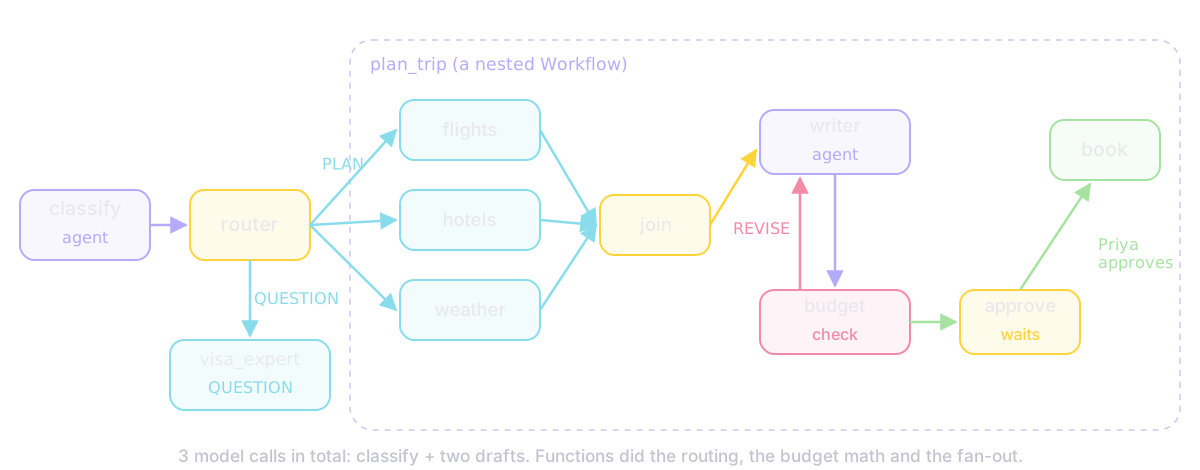
Three model calls in total. Functions did the routing, the budget math and the fan-out.
Guardrails: return a value to replace the step
Callbacks hook into fixed points: before and after the agent, each model call, and each tool. The rule: return None and ADK carries on; return a value and ADK uses it instead of the real step.
def budget_guard(tool, args, tool_context):
    if tool.name == "book_hotel" and args["total_usd"] > tool_context.state.get("budget_usd", 0):
        return {"error": f"Blocked: ${args['total_usd']} is over the ${tool_context.state['budget_usd']} budget."}
    return None
> My card is 4111 1111 1111 1111, book anything
trip_desk text "Please don't paste card numbers here."
> Book Palácio Luxe
trip_desk result book_hotel -> {'error': 'Blocked: $6200 is over the $5000 budget.'}
model calls made: 2 | hotels actually booked: []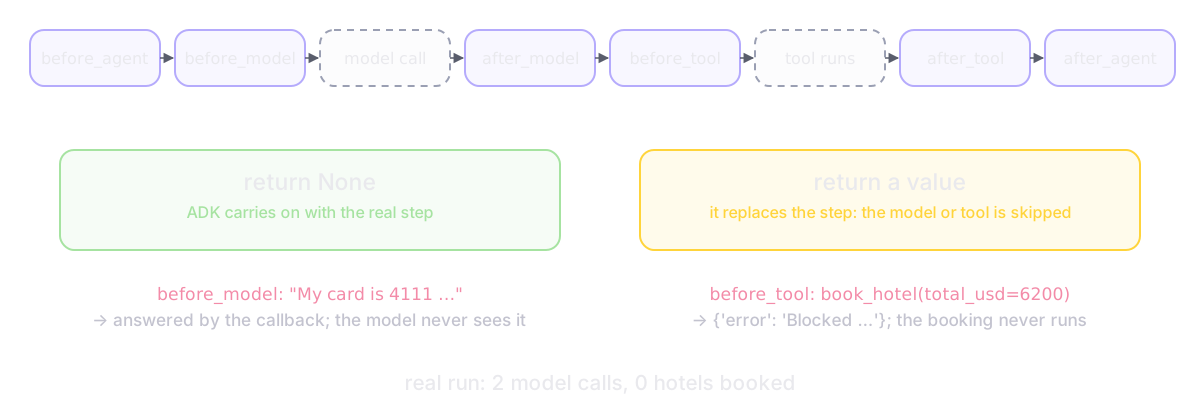
The before_model_callback answered the card-number message itself, so the model never saw the number. The before_tool_callback blocked the palace, so the booking function never ran.
Some steps need a person, not a rule. Mark a tool require_confirmation=True and the run pauses until the app sends back an approval; only then does the deposit go through, once (still experimental). Register callbacks once as a plugin to cover every agent, model call and tool. And set RunConfig(max_llm_calls=...): a model that never stopped calling tools was cut off after five calls when we set it to five. The default is 500.
Shipping it
adk createscaffolds an agent;adk webopens a dev UI with every event, state change and a trace of model and tool calls;adk api_serverputs it behind HTTP.adk evalruns saved conversations as tests. By default it requires exactly the right tool calls in order, and a final answer sharing at least 80% of its words with the expected one (ROUGE-1). Run it in CI.- Deploy to Agent Runtime on Google Cloud (called Vertex AI Agent Engine until April 2026; the command is still
adk deploy agent_engine), to Cloud Run or GKE, or any container. - Agents can call agents in other services over the open A2A protocol, and
run_livestreams audio both ways for voice agents.
What it costs, and where it bites
ADK is free; you pay for model tokens and hosting. On Agent Runtime the first 50 vCPU-hours a month are free, then about $0.085 per vCPU-hour, and sessions and Memory Bank have been billed since September 2026 (prices as of October 2026). The cost that grows fastest is model calls: every agent node in a loop that runs five times costs five times.
The sharp edges: in-memory sessions vanish on restart, parallel branches writing one key overwrite each other, transfers can bounce between agents, tool confirmation is experimental, built-in code execution can't share an agent with other tools, and state is saved as JSON, so keep it small and plain.
Is it worth using?
Use ADK when you're building more than one agent, when you want sessions, memory, evaluation and deployment from one kit, and especially on Gemini or Google Cloud.
Look elsewhere if your stack is already LangChain (ADK 2's graphs now overlap a lot with LangGraph), if you want to own every checkpoint yourself, or if it's one prompt and one tool. A function will do.
For multi-agent systems that have to ship, ADK is one of the most complete kits there is. Learn the event loop and the state prefixes first; almost every bug we reproduced came from one of them.
Versions: google-adk 2.11.0, Python 3.12, researched 7 October 2026. Sources: the ADK docs (event loop, state, memory, artifacts, graphs, callbacks, plugins, evaluation, deployment), the ADK 2.0 page, the adk-python changelog and source, the launch post, and Agent Platform pricing. Not verified: behavior with a real Gemini model (every run used a scripted model), Agent Runtime deployment, Memory Bank, A2A and live streaming.